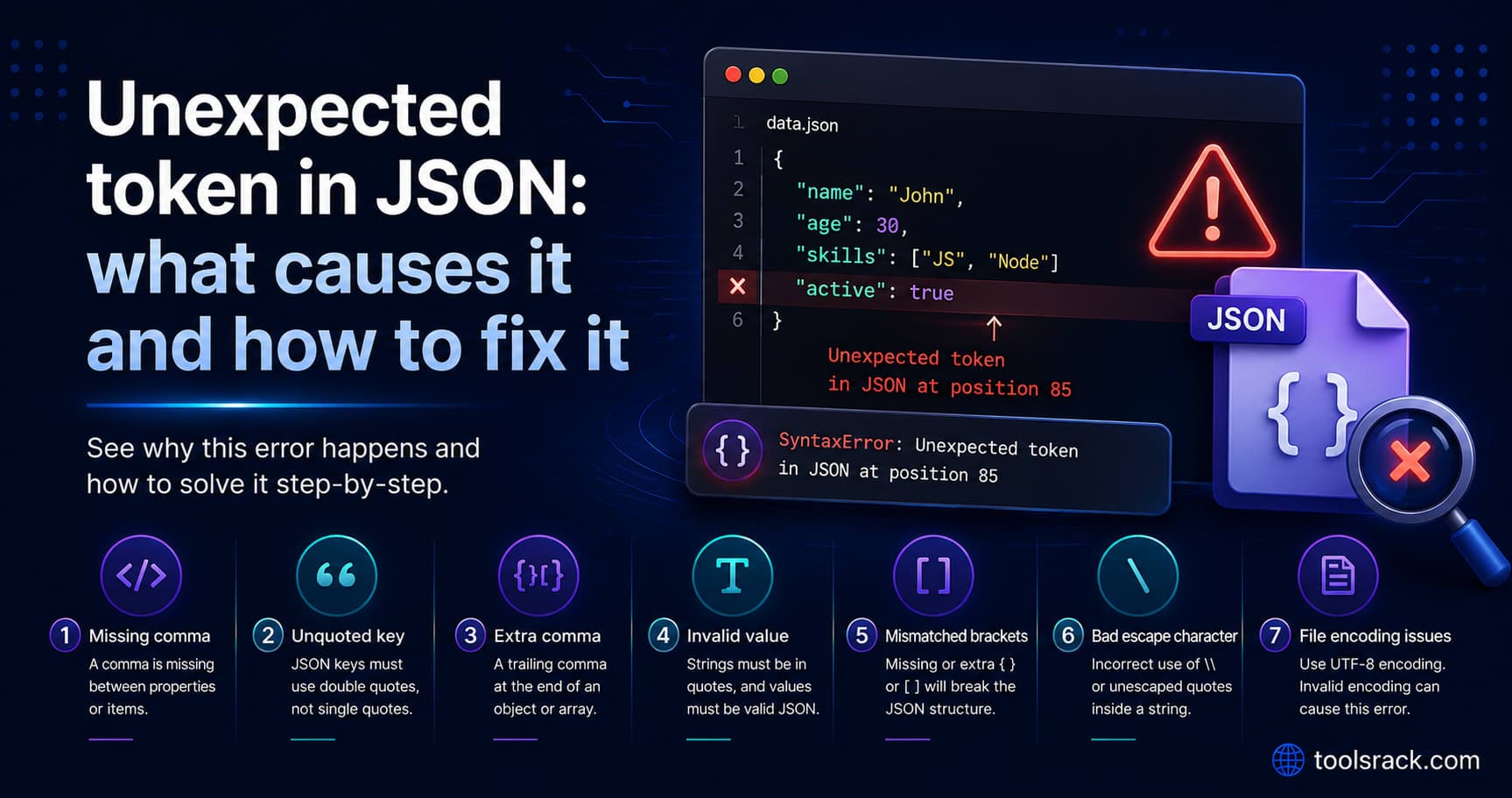
Unexpected token in JSON: what causes it and how to fix it
· Updated
By ToolsRacks Team · Developer Guides
The character named in a JSON parse error tells you the cause. A lookup table for every common token, starting with the one that is not a JSON problem at all.
Your code calls an API, tries to parse the response, and the console shows something like Unexpected token < in JSON at position 0. Nothing in that message tells you what is actually wrong — but the single character it names does, and it names a different character depending on the cause.
This guide is organised around that character. Find the token in your error, jump to that row, and you have the cause. The most common one by a wide margin is not a JSON problem at all.
- What it means: The JSON parser hit a character that cannot legally appear at that point and stopped.
- The position number: The character offset where parsing failed — usually a few characters after the real mistake.
- Most common cause:
Unexpected token <at position 0 means the server sent HTML, not JSON. Your JSON is fine; your request failed. - Fastest fix: Log the raw response text before parsing it, or paste it into a validator to see the exact failure point.
An "Unexpected token in JSON" error means JSON.parse() found a character that is not valid at that position in the document. The character named in the message tells you the cause: < means an HTML page was returned instead of JSON, } or ] usually means a trailing comma, ' means single quotes were used instead of double quotes, and an unexpected end of input means the response was truncated.
Read the token first, the position second
Every one of these errors names a character. That character is the diagnostic. Here is the full lookup.
| Message contains | Almost always means |
|---|---|
Unexpected token < at position 0 | The server returned HTML — an error page, a login redirect, or a 404 — not JSON. |
Unexpected token } or ] | A trailing comma before the closing brace or bracket. |
Expected property name or '}' | Single quotes, or an unquoted key. |
Unexpected token / | A comment. JSON has no comment syntax. |
Unexpected token N or u | NaN, Infinity or undefined — none are valid JSON values. |
Unexpected end of JSON input | The response was empty or cut off before the document closed. |
Unexpected token o at position 1 | You passed an object, not a string. It was stringified to [object Object] first. |
Wording varies between browsers — Chrome, Firefox and Safari phrase these differently, and Chrome changed its phrasing in recent versions. The character and the position are the parts that stay reliable.
The one that catches everybody: "Unexpected token <"
If the token is < and the position is 0, your JSON is not broken. You did not receive JSON at all.
Position 0 means the very first character was <, which is the opening of <!DOCTYPE html> or <html>. Your server sent back a web page and your code tried to parse it as data.
The usual reasons, in the order worth checking:
- The URL is wrong. A 404 handler returns an HTML error page with a 404 status. Your
fetchdid not throw, because a 404 is a valid HTTP response — it went straight to.json(). - You are not authenticated. The API redirected to an HTML login page.
- The server threw an exception. Many frameworks return a formatted HTML stack trace in development mode.
- A proxy or gateway intercepted the request. Captive portals, corporate proxies and CDN error pages all return HTML.
- You hit the frontend, not the API. A single-page app returns
index.htmlfor unknown routes, which is exactly what an API path typo looks like.
The diagnostic takes ten seconds — read the response as text before parsing it:
const res = await fetch(url)
const text = await res.text()
console.log(res.status, text.slice(0, 200))   // look at this
const data = JSON.parse(text)
If the log shows <!DOCTYPE html>, stop debugging your parser and fix the request. Checking res.ok before parsing prevents the whole class of problem.
The trailing comma
This is the most common genuine JSON error, and the message is confusing because it points at the wrong character.
{"name": "Ada", "role": "engineer",}The parser reports the closing brace at position 35, not the comma at 34. That is correct behaviour: after a comma, JSON requires another key. The brace is where the expectation was violated, so the brace is what gets named.
This slips in constantly because a trailing comma is perfectly legal in JavaScript object literals, in Python dictionaries, and in most code formatters' output. JSON never allowed it.
Single quotes and unquoted keys
{'name': 'Ada'}        // invalid
{name: "Ada"}          // invalid
{"name": "Ada"}        // valid
JSON requires double quotes on every key and every string value. Both invalid forms above are valid JavaScript, which is why they appear so often — someone copied an object literal out of code, or pasted a Python dictionary, and assumed it would parse.
Comments, NaN and other JavaScript habits
Standard JSON has no comments. Editors like VS Code accept them in their own configuration files — that dialect is called JSONC — but a strict parser, including every browser and most server libraries, will reject them.
{
  "port": 8080,  // dev only     ← Unexpected token /
  "timeout": NaN                 ← Unexpected token N
}NaN, Infinity and undefined are JavaScript values with no JSON equivalent. Use null, or a string, or omit the key.
"Unexpected end of JSON input"
This one means the document ended before it was complete. Three usual causes:
- An empty response. A 204 No Content, or a POST that returned nothing.
JSON.parse("")throws this exact error. - A truncated response. The connection dropped, or a log line, database column or spreadsheet cell cut the string short.
- A missing closing brace in a file you hand-edited.
Check the response length first. If it is zero, the problem is the endpoint, not the JSON.
A five-step debugging routine
- Log the raw text and the status code before parsing. This alone resolves the majority of these errors.
- Read the token named in the message and match it against the table above.
- Look at the character at the reported position in the raw string — not in a pretty-printed copy, since formatting shifts every offset.
- Paste the payload into a validator. Our free JSON formatter and validator parses in your browser, so a response containing tokens or customer data never leaves your machine, and it shows the failure point directly.
- Fix the first error only, then re-check. Later errors usually cascade from one missing bracket and disappear on their own.
Two errors that are not syntax errors
Some payloads parse perfectly and still break your application. Worth knowing, because no validator will flag them.
Duplicate keys. {"a":1,"a":2} is valid JSON. Parsers keep the last value silently, so a field you definitely sent can vanish without any warning.
Large integers lose precision. JSON numbers are parsed as doubles, so any integer above 9,007,199,254,740,991 gets rounded. This bites systems using large numeric IDs. Send them as strings.
JSON parsing questions
What does "at position 0" actually mean?
The failure happened at the very first character, so nothing valid was parsed at all. Combined with a < token it is a near-certain sign that HTML was returned instead of JSON.
Why does the position point at the wrong character?
It points at where the expectation broke, which is often one character after the actual mistake. A trailing comma is reported at the closing brace that follows it.
Why do Chrome and Firefox show different messages?
Each browser engine writes its own parser errors, and the wording changes between versions. Rely on the token and the position rather than on matching the exact sentence.
Can I make JSON.parse accept comments or trailing commas?
Not directly. Either strip them before parsing with a tolerant pre-processor, or use a format designed for configuration, such as YAML or JSON5. Do not ship a hand-rolled regex that strips comments — it will eventually mangle a URL containing //.
Is it safe to paste an API response into an online validator?
Only if it runs locally. Our validator parses entirely in the browser with no upload, but strip authorization headers and personal data from any payload before pasting it anywhere, including into a screenshot in a ticket.
The one-line version
Read the character in the message. If it is <, fix your request, not your JSON. If it is a brace, look for a trailing comma. Everything else is a JavaScript habit that JSON does not allow.