How long should a password be? The entropy behind the answer
· Updated
By ToolsRacks Team · Web & Security
16 random characters, or a 6-word passphrase for the ones you memorise. The entropy table, why length beats complexity, and why crack-time charts mislead.
Every site has a different rule. One demands at least 8 characters with a symbol. Another caps you at 16. A third rejects the symbol you chose. None of them explain what any of it achieves, and most of the advice online is a "time to crack" chart that quietly assumes things about the website you are signing up to.
Here is the actual arithmetic, what it does and does not protect against, and a straight answer for each kind of account.
- Short answer: 16 random characters for anything a password manager will fill in for you.
- For passwords you must memorise: a passphrase of 5–6 random words beats a short complex string.
- Length beats complexity. 20 lowercase characters are stronger than 12 characters using every symbol.
- Above about 80 bits of entropy, password length stops being your weakest point — reuse and phishing take over.
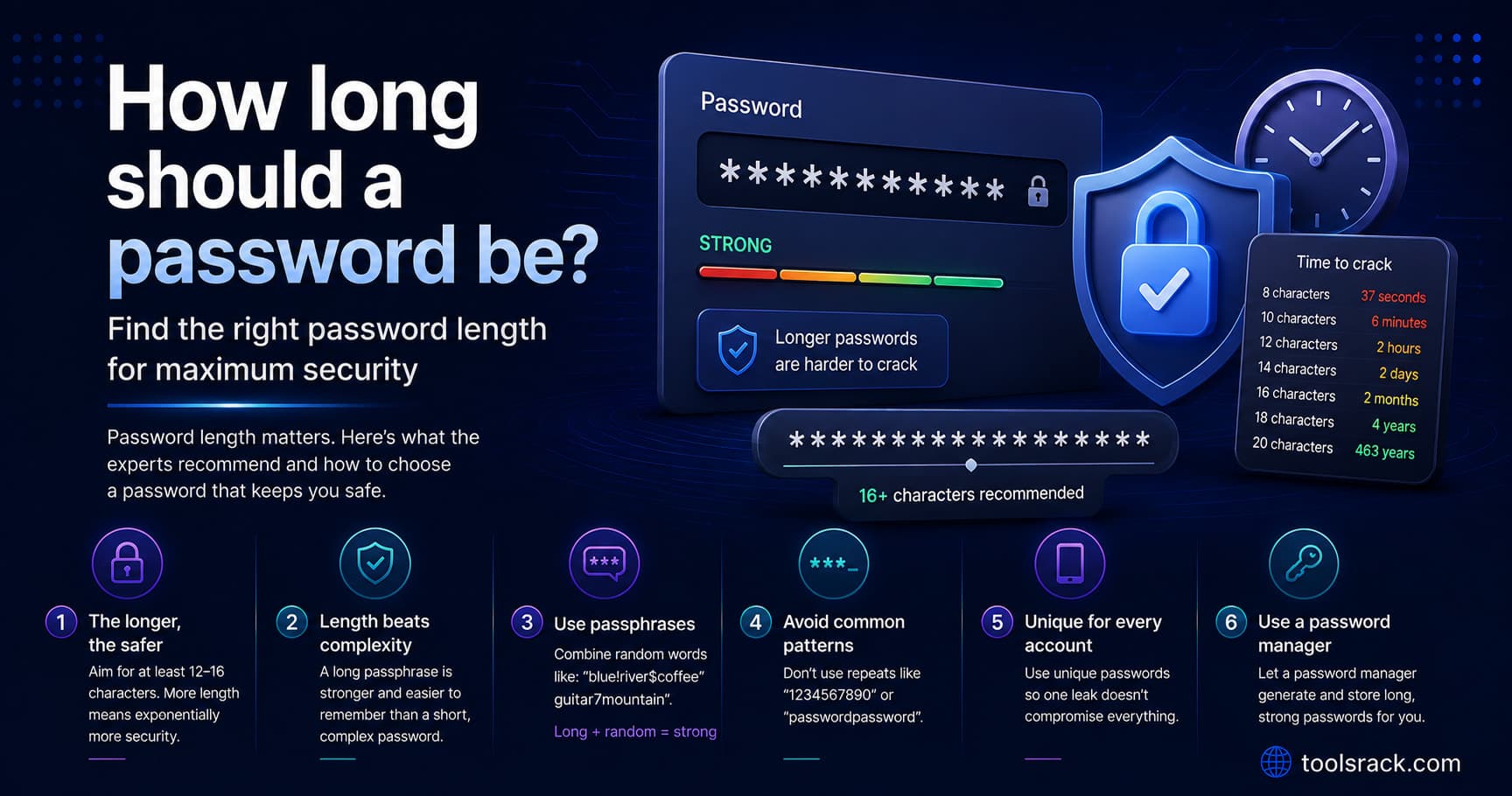
A password should be at least 16 randomly generated characters for accounts stored in a password manager, or a passphrase of 5 to 6 random words for the few you have to type from memory. Sixteen random characters from a mixed alphabet gives roughly 103 bits of entropy, which is far beyond the reach of any realistic brute-force attack. Beyond that point, using a unique password per site and enabling two-factor authentication protects you far more than adding characters.
What password strength actually measures
Strength is entropy: how many equally likely passwords the generator could have produced. It is measured in bits, and each additional bit doubles the work an attacker has to do.
The formula is simple — entropy equals length multiplied by log₂ of the alphabet size:
- Lowercase only: 26 characters → 4.7 bits each
- Upper + lower: 52 → 5.7 bits each
- Upper + lower + digits: 62 → 5.95 bits each
- All four sets including symbols: 88 → 6.46 bits each
Crucially, this only applies to a randomly generated password. If you chose it yourself, the maths does not hold — human choices cluster around predictable patterns, and cracking tools try those first. "Tr0ub4dor&3" looks like it should be strong and is not, because the substitutions are the ones everybody makes.
The entropy table
| Character set | 12 chars | 16 chars | 20 chars | 24 chars |
|---|---|---|---|---|
| Lowercase only (26) | 56 bits | 75 bits | 94 bits | 113 bits |
| Lowercase + digits (36) | 62 bits | 83 bits | 103 bits | 124 bits |
| Upper + lower + digits (62) | 71 bits | 95 bits | 119 bits | 143 bits |
| All four sets (88) | 78 bits | 103 bits | 129 bits | 155 bits |
Rough interpretation:
- Below 60 bits — within reach of a determined offline attack against a poorly protected password database.
- 70–80 bits — comfortable for ordinary accounts.
- 100+ bits — the password is no longer the weak link by any margin.
Length beats complexity, and here is the proof
Compare two passwords from the table:
- 20 characters, lowercase only: 94 bits
- 12 characters, every symbol available: 78 bits
The all-lowercase one is roughly 65,000 times harder to brute-force, despite looking far less "complex". Adding a character multiplies the search space by the alphabet size; adding symbols only enlarges the alphabet a little.
This is why the practical advice is: if a site rejects symbols, do not argue with it — add four more characters instead. And it is why composition rules ("must contain one uppercase, one digit, one symbol") are largely counterproductive. They do not create entropy; they push people towards Password1! and a capital letter at the front with a digit at the end.
Why "time to crack" charts mislead you
You have seen the tables: "8 characters — instantly; 12 characters — 34,000 years." They are not exactly wrong, but they hide the assumption that matters most.
Crack time depends far more on how the website stores your password than on the password itself. A site hashing with a fast algorithm like MD5 can be attacked billions of times per second. A site using a modern, deliberately slow algorithm such as bcrypt or Argon2 might allow only a few thousand attempts per second on the same hardware — a difference of several million times, from a decision you had no part in.
Three more things those charts leave out:
- Online attacks are rate-limited. Guessing against a live login form is throttled and locked out. Brute force is only a realistic threat after a database is stolen.
- Attackers do not start with brute force. They start with lists of breached passwords and common patterns. A predictable 14-character password falls before a random 10-character one.
- Most compromises are not cracking at all. Credential stuffing — reusing a password that leaked elsewhere — and phishing account for the overwhelming majority of real account takeovers.
So treat those charts as a rough illustration of why length matters, not as a prediction about your account.
Passphrases: for the passwords you must remember
You will have a handful of passwords that cannot live in a manager — the master password for the manager itself, your device login, sometimes your email. For those, a random passphrase is the right tool.
The method: pick 5 or 6 words at random from a large list, and join them. Random is the operative word — a memorable phrase from a song or a book has almost no entropy, because it appears in the training data of every cracking dictionary.
Done properly with a large word list, each word contributes roughly 12–13 bits, so:
- 4 words — around 50 bits. Not enough on its own any more.
- 5 words — around 64 bits. Reasonable.
- 6 words — around 77 bits. Solid, and still memorable.
The advantage is not that a passphrase is stronger per character — it is not. The advantage is that people can actually remember a 6-word phrase, and will not write it on a sticky note the way they do with a 16-character random string.
What length to use, by account type
| Account | Recommended | Reasoning |
|---|---|---|
| Everyday website login | 16 random characters | ~103 bits. Your manager types it, so length costs you nothing. |
| Password manager master password | 6-word random passphrase | The one you must memorise. Never reuse it anywhere. |
| Email account | 16+ characters, plus 2FA | Email resets every other account, so it is the highest-value target you own. |
| Banking | Whatever the maximum allows, plus 2FA | Many banks cap length — use every character they permit. |
| API keys and service credentials | 32+ characters, letters and digits | Long enough to be irrelevant, and free of symbols that break connection strings and shell escaping. |
| Wi-Fi | 20+ characters, letters and digits | Typed once per device, often on a TV remote. Length carries it; symbols only add pain. |
| Shared or temporary access | 16 characters, rotated after handover | Assume it will travel over chat or email. |
Generating one properly
Randomness has to come from a cryptographic source, not from a person and not from a simple random function. Our free password generator uses the browser's cryptographic random number generator, offers 6 to 64 characters across four character sets, and runs entirely on your device — nothing is transmitted, logged or stored, which is the only acceptable design for a tool of this kind.
Two practical notes when you use it:
- Save it before you navigate away. The page keeps no history and cannot recover a password you did not store.
- Turn symbols off for service credentials. Quotes, backslashes and ampersands break connection strings and shell scripts. Add length instead.
What matters more than length
Once you are past roughly 80 bits, adding characters is no longer where your risk is. These are:
- A unique password per site. A 64-character password reused on two sites is only as safe as the weaker site's breach history. This is the single most important habit.
- Two-factor authentication. It protects the account even when the password leaks. An app-based code or a hardware key is meaningfully better than SMS.
- A password manager. It makes uniqueness practical, and it will not autofill your credentials into a lookalike phishing domain — a defence you do not get from memory.
- Not rotating on a schedule. Current NIST guidance advises against forced periodic changes, because they push people towards predictable increments. Change a password when there is evidence of compromise.
- Checking your email against known breaches so you know which passwords need changing and which do not.
Password questions people ask
Is 8 characters still enough?
No. Eight random characters is roughly 52 bits even with a full alphabet, which is within reach of an offline attack against a badly protected database. It survives as a minimum in old policies, not as a recommendation.
Is 12 characters enough?
For a low-value account with 2FA, yes — around 78 bits with a full alphabet. For email, banking or anything financial, go to 16. The cost of the extra four characters is zero when a manager fills them in.
Does adding symbols really help?
A little. Moving from 62 to 88 characters in the alphabet adds about half a bit per character. Adding one more character adds about 6.5 bits. Length is the better lever by an order of magnitude.
Why do some sites limit password length?
Usually legacy database fields or old systems that never got updated. It is a poor signal about a site's security practices, and where you meet a cap, use every character it allows and enable 2FA.
Should I change my passwords every 90 days?
No, unless your organisation requires it. Scheduled rotation encourages predictable patterns like Summer2026! followed by Autumn2026!. Change on evidence of compromise instead.
Is a sentence a good password?
A sentence you invented is far better than a single word and far worse than a random passphrase, because human-composed sentences follow grammar and common phrasing that cracking tools model. Random word selection is what produces the entropy.
What does "military-grade" mean on a password tool?
Nothing. It is marketing language with no technical definition. What matters is whether the randomness comes from a cryptographic source, and how the site receiving your password stores it.
If you change only one thing
Sixteen random characters for anything your password manager fills in, a 6-word random passphrase for the two or three you must remember, and two-factor authentication everywhere it is offered. Length beats complexity, uniqueness beats length, and nothing beats not reusing passwords.