How long does DNS propagation take? (and why nothing propagates)
· Updated
By ToolsRacks Team · Web & Security
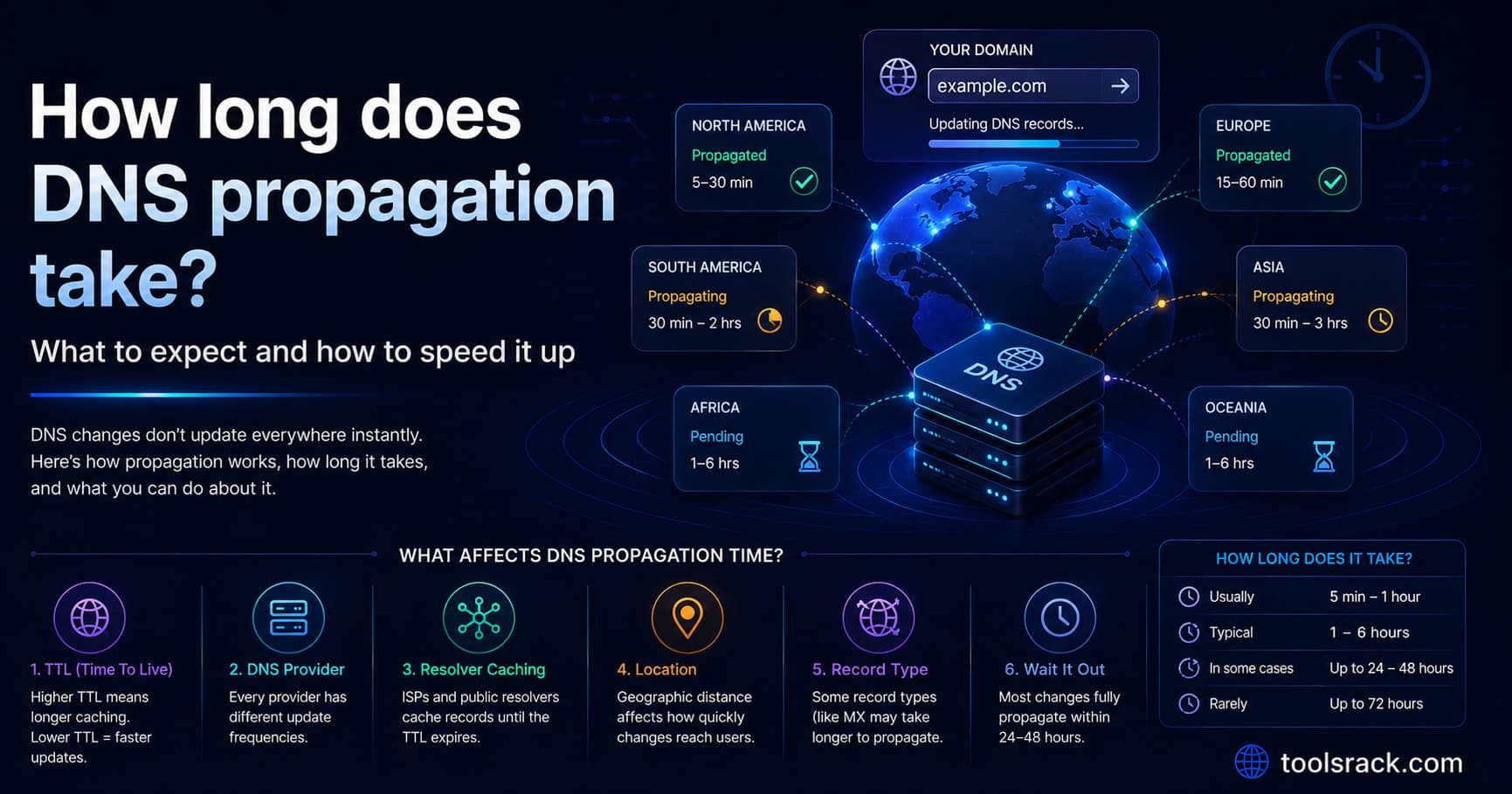
Usually minutes to a few hours, 48 hours at worst. But DNS does not propagate — it is your old TTL expiring in thousands of separate caches.
You changed your domain's DNS records an hour ago. The site loads on your phone but not on your laptop. A colleague in another country still sees the old server. Everyone tells you to "wait 24 to 48 hours for propagation" — and that advice is both roughly right and based on a misunderstanding of what is actually happening.
Nothing propagates. Once you understand what really causes the delay, you can predict it, and you can make the next change take minutes instead of days.
- Typical: most people see the change within minutes to a few hours.
- Worst case: up to 48 hours, and occasionally 72 for a name server change.
- What controls it: the TTL on the record — the time each resolver is allowed to cache the old answer.
- The trick: lower the TTL 24–48 hours before you make the change. Doing it on the day does nothing.
DNS changes usually take effect within minutes to a few hours, with a worst case of 24 to 48 hours. The delay is not a distribution process — DNS does not push anything anywhere. Each resolver independently caches the previous answer for the length of that record's TTL, and only asks again once the cache expires. Lowering the TTL before making a change is the only reliable way to make it take effect quickly.
Why "propagation" is the wrong word
The term suggests your change spreads outward across the internet, server by server, like a wave. That is not how DNS works, and picturing it that way makes the delay impossible to predict.
What actually happens: you update the record at your DNS provider. That change is live at the authoritative name server immediately. But nobody queries the authoritative server on every page load. Their internet provider's resolver has an answer stored from the last time somebody asked, and it will keep serving that stored answer until its timer runs out.
So the delay is not distribution. It is thousands of independent caches expiring at different moments, because each one started its timer whenever it happened to ask.
That single fact explains everything people find confusing about DNS changes — including why two people on the same street can see different versions of your site.
TTL: the number that decides everything
Every DNS record carries a TTL — time to live — in seconds. It tells resolvers how long they may reuse the answer before asking again.
| TTL value | In practice | When to use it |
|---|---|---|
| 300 (5 minutes) | Changes visible almost immediately | Before and during a migration |
| 3600 (1 hour) | Most people see changes within the hour | A reasonable everyday default |
| 14400 (4 hours) | Half a working day | Stable records you rarely touch |
| 86400 (24 hours) | A full day of stale answers | Very stable records — and the usual reason a change "takes forever" |
If your record has been sitting at 86400 and you change it today, a resolver that cached the old value five minutes before your edit will keep serving it for another 23 hours and 55 minutes. Nothing you do afterwards shortens that.
The migration sequence that works
This is the whole technique, and the order is what matters.
- 24 to 48 hours before the change, lower the TTL on the records you are about to edit — to 300 seconds. Change nothing else.
- Wait out the old TTL. If it was 86400, you must wait a full day for every cache to pick up the new short TTL. This waiting period is the part people skip, and skipping it is why the technique "does not work" for them.
- Make the real change. Because resolvers are now refreshing every five minutes, the new value reaches almost everyone within minutes.
- Verify from outside your own network. Your browser and router cache too, so your own machine is the least reliable place to check.
- Raise the TTL back to 3600 or higher once you are confident, to reduce lookup load.
Lowering the TTL on the day of the change has no effect on caches that already hold the old value at the old TTL — a point worth being blunt about, because it is the single most common misunderstanding in this whole topic.
How long each kind of change takes
| Change | Typical | Worst case |
|---|---|---|
| A record — pointing a domain at a new server | Minutes to a few hours | The old TTL |
| MX record — moving email | Minutes to a few hours | The old TTL |
| TXT record — adding a verification string | Minutes | The old TTL |
| CNAME | Minutes to a few hours | The old TTL |
| Name server (NS) change at the registrar | 2–24 hours | 48–72 hours |
| New domain, first time | Minutes to a few hours | 24 hours |
Name server changes are the genuinely slow one. They involve the domain registry rather than just your DNS zone, and registry TTLs are long and outside your control. That is where the traditional "48 hours" advice really comes from.
Why different people see different things
- Different resolvers, different timers. Someone on Google's public DNS and someone on their ISP's resolver cached your record at different moments, so they expire at different moments.
- Your own devices cache too. The browser, the operating system and the router each keep their own copy. This is why the site works for a colleague but not for you.
- Mobile networks cache aggressively. Checking on mobile data is a useful independent test — and often the last to update.
- Some resolvers ignore short TTLs. A few ISPs enforce a minimum, so a 300-second TTL may be treated as an hour regardless of what you set.
Checking properly
Your own browser is the worst place to test a DNS change, because it sits behind three layers of cache. Query the records directly instead — our free DNS checker looks up A, AAAA, MX, TXT, NS and CNAME records for any domain and also shows registrar and registration details, so you can confirm what is actually published rather than what your laptop remembers.
One honest limitation to be aware of, for that tool and for most single-page checkers: it queries from one location using one resolver. It tells you what is published right now, not who around the world can see it yet. For watching a cutover region by region, a purpose-built multi-location checker is the right instrument.
To clear your own caches while testing:
- Windows:
ipconfig /flushdns - macOS:
sudo dscacheutil -flushcache; sudo killall -HUP mDNSResponder - Linux:
sudo systemd-resolve --flush-caches - Chrome: visit
chrome://net-internals/#dnsand clear the host cache
Avoiding downtime during a move
The safest migrations do not rely on timing at all.
- Set the new server up completely first — files, database, certificate — and test it by its IP or a temporary hostname before touching DNS.
- Keep the old server running for at least 72 hours after the change. Visitors hitting a cached old address should still get a working site, not an error.
- Confirm the certificate covers both hostnames on the new server before switching, using an SSL certificate check — a working DNS change that lands on an invalid certificate looks worse to visitors than no change at all.
- Move email separately from the website. Changing A and MX records at the same moment makes it impossible to tell which one broke.
- Migrate on a Tuesday morning, not a Friday afternoon. If something needs a full TTL to recover, you want a working week ahead of you.
DNS questions people ask
Can I force DNS to update faster?
Not globally — you cannot reach into other people's resolvers. You can only flush your own caches and wait out the TTL for everyone else. Lowering the TTL in advance is the only real control you have.
Why does it work on my phone but not my computer?
Different networks use different resolvers with independently expiring caches, and your computer has its own local cache on top. Flush the local cache and try again.
Does clearing my browser cache help?
Only for the browser's own DNS cache, which is one of several layers. Clearing browsing history and cookies does nothing for DNS.
Why is my email down after changing hosting?
Almost always because the MX records were not carried over to the new DNS zone. When you move name servers, every record has to be recreated at the new provider — many people copy the A record and forget MX, SPF and DKIM.
How long does a name server change take?
Longer than a record change: typically 2 to 24 hours and occasionally up to 72, because registry-level TTLs are long and you cannot lower them.
What TTL should I use normally?
3600 seconds is a sensible default for most records — an hour of caching, with changes visible within the hour. Drop to 300 before a planned change and raise it back afterwards.
What to expect, in one line
Expect minutes to a few hours, with 48 hours as the outer limit. The delay is your old TTL expiring in thousands of independent caches, not a wave spreading across the internet — so lower the TTL before you make the change, and check from outside your own network.